
Target API

Connect the system the data lands in.

Your target system is yours, so there is no ready-made connector for it. There is a documented contract instead: an import that does the work, and a sync that closes the gap until cutover.

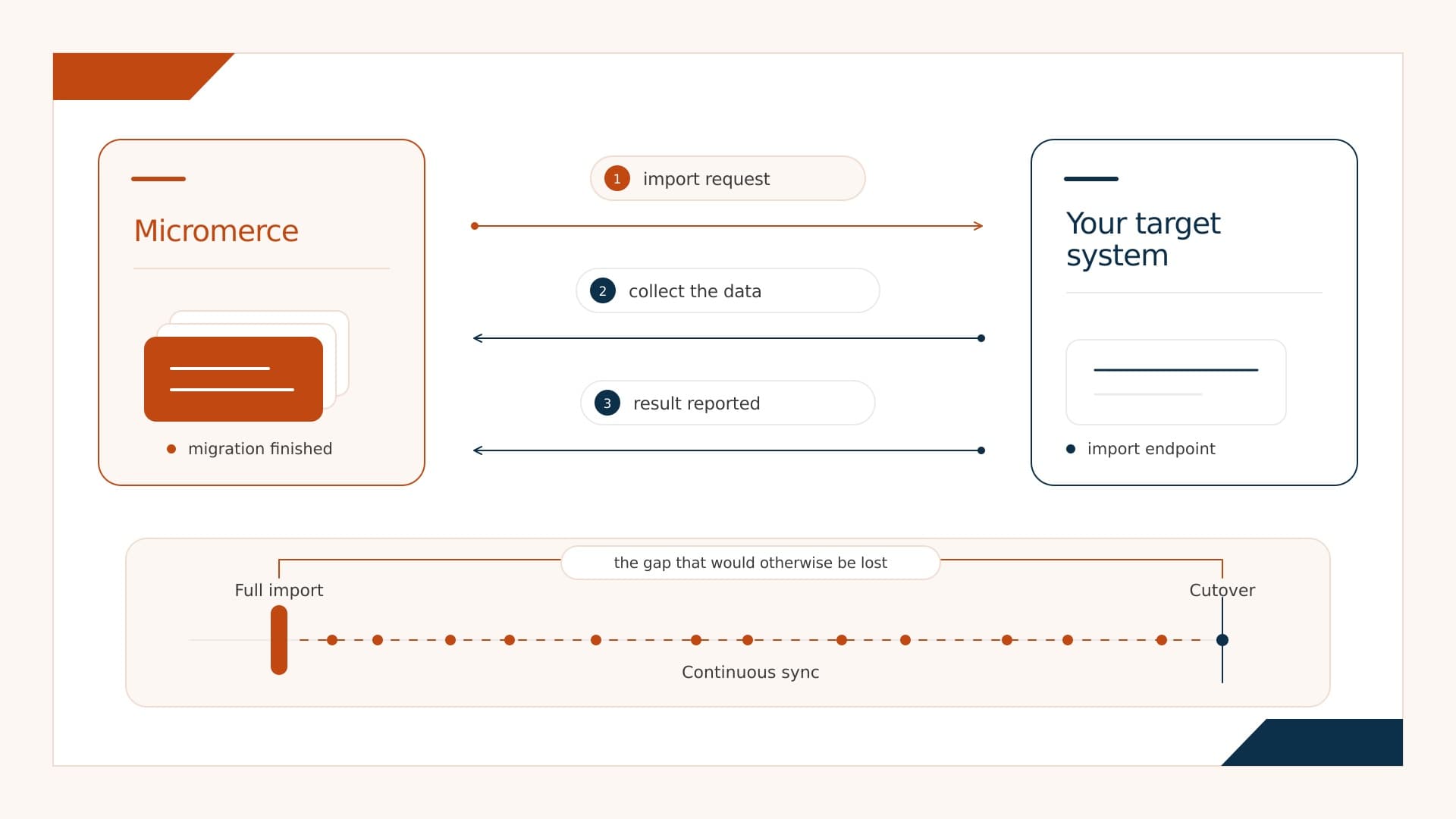
Micromerce hands the finished data to your target system, which collects it and reports the result. Below, a timeline: the full import as a snapshot, continuous sync carrying every change up to the cutover.

One default, one addition

Every integration starts with the import. Continuous sync is what you add on top when the source keeps changing between the full import and the cutover.

The default

Import on request

A migration runs, we hand the finished data set to your system, your system reports back once it is in. Repeat as often as you like: a test import behaves exactly like the real one, so the run your customer signs off on is the run that goes live. This is how every integration starts.

Covers

The full data set, for a new customer or a migration with an agreed cutover date.

On top of it

Continuous sync

A full import is a snapshot, and people keep working in the source afterwards. Continuous sync carries those changes across as a stream of events, so the gap between the import and the cutover never turns into lost data. It is the same event-driven pattern our own services use to stay in step with each other.

Covers

The delta after the full import, so nobody has to freeze the source or repeat the migration on cutover night.

How an import runs

Five steps, the same for a test import and for the go-live.

  1. 1

    The import is triggered

    Someone starts a test or live import from the Onboarding Backoffice. Your system is not involved yet.

  2. 2

    We call your system

    Your import endpoint is told where the finished data is, how to fetch it, and where to report back to.

  3. 3

    You collect the data

    Your system fetches the transformed data and its documents. The credentials come with the request and can be renewed at any time.

  4. 4

    You process it

    In your own time. While it runs you can report progress, which drives a live progress bar in the Backoffice instead of a spinner.

  5. 5

    You report back

    Success or error, plus anything worth keeping: error logs, validation output, warnings, statistics.

What arrives, and in what shape

You pick the format your system reads most easily. We deliver in it, so nobody writes a parser for our convenience.

JSON

One document per record, nested the way your model expects.

JSONL

One record per line, for large volumes you want to stream rather than load.

SQL inserts

Ready-to-run statements against your schema, in the order the relations need.

XML

For target systems whose import already speaks it.

A prepared database

The finished database, handed over complete. Nothing to import at all.

Whichever you pick, the job on your side stays the same: take the delivery, process it, and stand up the new tenant. Everything before that is ours.

What you decide

The contract bends to your API rather than the other way round. These decisions are made once, when the integration is set up.

DecisionOptionsWhat we usually see
How we authenticate to youNone, OAuth 2.0, OIDC or something of your ownOAuth 2.0, which is what existing production integrations use
What the request looks likeYour field names, your wrapper, extra fields you needA handful of renamed fields and one flag of your own
What happens before an importNothing, or a lookup or validation step firstNothing for a new system, a lookup for an established one
How you report backResult only, or result plus a progress signalBoth, once a migration runs long enough to be worth watching
How we collect your result filesLinks that need no login, or an authenticated fetchLinks that need no login, simpler on both sides

Each of these is written down per integration, so nobody has to remember what was agreed six months ago.

What your system needs to support

Two things are genuinely required. The rest is what turns a migration into something you can rehearse, and it is what most integrations end up doing.

Required

  • Take the import in the background rather than holding the line open while it runs.
  • Report the result back when it finishes, through the callback. Progress along the way is optional and drives the live bar in the Backoffice.

Recommended

  • Accept test imports at any time, repeatedly, per customer.
  • Make a test import behave exactly like a live one. The only difference should be the address or the credentials.
  • Mark a live import as final, so it is never mistaken for another test.
  • Delete test data by itself after a set period.

Integrations do run without test imports, and we set those up. It does mean every rehearsal you cannot hold becomes a risk you carry into go-live, which is why we push for them.

Fixed on our side, flexible on yours

A small part is the same in every integration. Everything else adapts to what you already have.

The same every time

  • How your system proves who it is when it collects the data.
  • What the standard responses mean.
  • That there is a result report at the end. Its shape can be mapped.

Adapted to you

  • How we authenticate towards your system.
  • Which address we call, and what the request carries.
  • Whether anything has to happen before the import starts.
  • Whether you report progress as well as the result.

Frequently asked

Not to get started. The import is the default and handles a migration with an agreed cutover on its own. You add the sync when people keep working in the source between the full import and the switch, so those changes come across instead of being lost or migrated twice.

One endpoint that accepts an import, one call back to us when it is done, and a way for us to ask how it is going. Everything beyond that is a choice, not a requirement.

No. The field names, the address and the authentication follow what you already have. That is the point of agreeing them per integration rather than publishing one rigid format.

That is how we set it up wherever the target system allows it. Test imports run as often as you want and behave exactly like the live one, so the run your customer approves is the run that goes live. Where a system cannot offer them, the integration still works, it just gives up the rehearsal.

No, and that is deliberate. It is a plain web interface, so you build it in whatever your backend is already written in.

You get them when the integration is set up: the exact endpoints, what a request carries, how the result is reported and which responses we expect, written for the people who will implement it. Ask on the call and we send them over.

Want us to look at your API?

Bring the endpoint you would import into. We walk through the contract, flag what needs adapting, and tell you what the integration takes.

Related: the Data Migration Engine that produces the data, the sources it reads and every other integration.